通知(进阶) 1.创建通知通道并请求通知权限
2.用getSystemService()获取一个NotificationManager对通知进行管理
3.创建Notification对象并进行一些基础设置
4.用notify()显示通知
1 2 3 4 5 6 7 8 9 10 11 12 13 14 15 16 17 18 19 20 21 22 23 24 25 26 27 28 29 30 31 32 33 34 35 36 37 38 39 40 41 42 43 44 45 46 47 48 49 50 51 52 53 54 55 56 57 58 59 60 61 62 63 64 65 66 67 68 69 70 71 72 73 74 75 76 77 78 79 80 81 82 83 84 85 86 87 88 89 90 91 92 93 94 95 96 97 98 99 100 101 102 103 104 105 106 107 108 109 110 111 112 113 114 115 116 117 118 119 120 121 122 123 124 125 126 127 128 129 130 131 132 133 134 135 136 137 138 139 140 141 142 143 public class MainActivity extends AppCompatActivity implements View .OnClickListener { @Override protected void onCreate (Bundle savedInstanceState) { super .onCreate(savedInstanceState); setContentView(R.layout.activity_main); createNotificationChannel(); Button sendNotice = findViewById(R.id.send_notice); sendNotice.setOnClickListener(this ); } @Override public void onClick (View v) { if (v.getId() == R.id.send_notice) { try { Intent intent = new Intent (this , NotificationActivity.class); PendingIntent pi = PendingIntent.getActivity(this , 0 , intent, PendingIntent.FLAG_UPDATE_CURRENT); NotificationManager manager = (NotificationManager) getSystemService(NOTIFICATION_SERVICE); Notification notification = new NotificationCompat .Builder(this , "default_channel_id" ) .setContentTitle("This is content title" ) .setContentText("Learn how to build notifications, send and sync data, and use voice actions. Get the official Android IDE and developer tools to build apps for Android." ) .setWhen(System.currentTimeMillis()) .setSmallIcon(R.mipmap.ic_launcher) .setLargeIcon(BitmapFactory.decodeResource(getResources(), R.mipmap.ic_launcher)) .setContentIntent(pi) .setAutoCancel(true ) .setDefaults(NotificationCompat.DEFAULT_ALL) .setStyle(new NotificationCompat .BigTextStyle().bigText("Learn how to build notifications, send and" + "sync data, and use voice actions,Get the official Android IDE and developer tools to build apps for Android." )) .setPriority(NotificationCompat.PRIORITY_MAX) .build(); if (Build.VERSION.SDK_INT >= Build.VERSION_CODES.TIRAMISU) { if (ContextCompat.checkSelfPermission(MainActivity.this , Manifest.permission.POST_NOTIFICATIONS) != PackageManager.PERMISSION_GRANTED) { ActivityCompat.requestPermissions(MainActivity.this , new String []{Manifest.permission.POST_NOTIFICATIONS}, 1 ); } else { manager.notify(1 , notification); } } else { manager.notify(1 , notification); } } catch (Exception e) { e.printStackTrace(); Toast.makeText(this , "发送通知失败: " + e.getMessage(), Toast.LENGTH_LONG).show(); } } } @Override public void onRequestPermissionsResult (int requestCode, @NonNull String[] permissions, @NonNull int [] grantResults) { super .onRequestPermissionsResult(requestCode, permissions, grantResults); NotificationManager manager = (NotificationManager) getSystemService(NOTIFICATION_SERVICE); try { Notification notification = new NotificationCompat .Builder(this , "default_channel_id" ) .setContentTitle("This is content title" ) .setContentText("Learn how to build notifications, send and sync data, and use voice actions. Get the official Android IDE and developer tools to build apps for Android." ) .setWhen(System.currentTimeMillis()) .setSmallIcon(R.mipmap.ic_launcher) .setLargeIcon(BitmapFactory.decodeResource(getResources(), R.mipmap.ic_launcher)) .setAutoCancel(true ) .setDefaults(NotificationCompat.DEFAULT_ALL) .setStyle(new NotificationCompat .BigTextStyle().bigText("Learn how to build notifications, send and" + "sync data, and use voice actions,Get the official Android IDE and developer tools to build apps for Android." )) .setPriority(NotificationCompat.PRIORITY_MAX) .build(); switch (requestCode) { case 1 : if (grantResults.length > 0 && grantResults[0 ] == PackageManager.PERMISSION_GRANTED) { manager.notify(1 , notification); } else { Toast.makeText(this , "You denied the permission" , Toast.LENGTH_SHORT).show(); } break ; default : break ; } } catch (Exception e) { e.printStackTrace(); Toast.makeText(this , "发送通知失败: " + e.getMessage(), Toast.LENGTH_LONG).show(); } } private void createNotificationChannel () { if (Build.VERSION.SDK_INT >= Build.VERSION_CODES.O) { NotificationChannel channel = new NotificationChannel ( "default_channel_id" , "Default Channel" , NotificationManager.IMPORTANCE_DEFAULT ); NotificationManager manager = (NotificationManager) getSystemService(NOTIFICATION_SERVICE); manager.createNotificationChannel(channel); } } }
1
2
3
4
5
6
7
8
9
10
public class NotificationActivity extends AppCompatActivity { @Override protected void onCreate (Bundle savedInstanceState) { super .onCreate(savedInstanceState); setContentView(R.layout.notification_layout); NotificationManager manager=(NotificationManager) getSystemService(NOTIFICATION_SERVICE); manager.cancel(1 ); } }
1
2
<uses-permission android:name="android.permission.POST_NOTIFICATIONS" /> <uses-permission android:name="android.permission.VIBRATE" />
摄像头和相册 调用摄像头拍照 1.设置Button和ImageView控件
2.申请相机权限,创建File对象存放在SD卡的应用关联缓存目录下
3.把File转换为Uri,被内容提供器FileProvider通过getUriForFile()接收
4.构建intent启动相机
5.重写onActivityResult处理结果
6.在AndroidManifest.xml注册内容提供器,声明权限
7.在xml目录下创建file_paths.xml共享路径
1
2
3
4
5
6
7
8
9
10
11
12
13
14
15
16
17
18
19
20
21
22
23
24
25
26
27
28
29
30
31
32
33
34
35
36
37
38
39
40
41
42
43
44
45
46
47
48
49
50
51
52
53
54
55
56
57
58
59
60
61
62
63
64
65
66
67
68
69
70
public class MainActivity extends AppCompatActivity { public static final int TAKE_PHOTO=1 ; public static final int CHOOSE_PHOTO=2 ; private ImageView picture; private Uri imageUri; @Override protected void onCreate (Bundle savedInstanceState) { super .onCreate(savedInstanceState); setContentView(R.layout.activity_main); Button takePhoto=(Button) findViewById(R.id.take_photo); picture =(ImageView) findViewById(R.id.picture); takePhoto.setOnClickListener(new View .OnClickListener() { @Override public void onClick (View view) { File outputImage=new File (getExternalCacheDir(),"output_image.jpg" ); try { if (outputImage.exists()){ outputImage.delete(); } outputImage.createNewFile(); } catch (IOException e) { e.printStackTrace(); } if (Build.VERSION.SDK_INT>=24 ) { imageUri= FileProvider.getUriForFile(MainActivity.this ,"com.example.cameraalbumtest.fileprovider" ,outputImage); }else { imageUri=Uri.fromFile(outputImage); } Intent intent=new Intent ("android.media.action.IMAGE_CAPTURE" ); intent.putExtra(MediaStore.EXTRA_OUTPUT,imageUri); startActivityForResult(intent,TAKE_PHOTO); } }); } @Override protected void onActivityResult (int requestCode, int resultCode, @Nullable Intent data) { super .onActivityResult(requestCode, resultCode, data); switch (requestCode){ case TAKE_PHOTO: if (resultCode == RESULT_OK) { try { Bitmap bitmap = BitmapFactory.decodeStream(getContentResolver().openInputStream(imageUri)); picture.setImageBitmap(bitmap); } catch (FileNotFoundException e) { e.printStackTrace(); } } break ; default : break ; } } } }
1
2
3
4
5
6
7
8
9
<provider android:name="androidx.core.content.FileProvider" android:authorities="com.example.cameraalbumtest.fileprovider" android:exported="false" android:grantUriPermissions="true" > <meta-data android:name="android.support.FILE_PROVIDER_PATHS" android:resource="@xml/file_paths" /> </provider>
1 <uses-permission android:name="android.permission.WRITE_EXTERNAL_STORAGE" />
1
2
3
4
5
<paths xmlns:android="http://schemas.android.com/apk/res/android" > <external-path name="my_images" path="" /> </paths>
从相册中选择图片 1.申请权限
2.创建并调用openAlum()方法
3.重写onActivityResult处理结果
4.针对不同图片格式进行不同操作
1
2
3
4
5
6
7
8
9
10
11
12
13
14
15
16
17
18
19
20
21
22
23
24
25
26
27
28
29
30
31
32
33
34
35
36
37
38
39
40
41
42
43
44
45
46
47
48
49
50
51
52
53
54
55
56
57
58
59
60
61
62
63
64
65
66
67
68
69
70
71
72
73
74
75
76
77
78
79
80
81
82
83
84
85
86
87
88
89
90
91
92
93
94
95
96
97
98
99
100
101
102
103
104
105
106
107
108
109
110
111
112
113
114
115
116
117
118
119
120
121
122
123
124
125
126
127
128
129
130
131
132
133
134
135
136
137
138
139
140
141
142
143
144
145
146
147
148
149
150
151
152
153
154
155
156
157
158
159
160
161
162
public class MainActivity extends AppCompatActivity { public static final int TAKE_PHOTO=1 ; public static final int CHOOSE_PHOTO=2 ; private ImageView picture; private Uri imageUri; @Override protected void onCreate (Bundle savedInstanceState) { super .onCreate(savedInstanceState); setContentView(R.layout.activity_main); Button takePhoto=(Button) findViewById(R.id.take_photo); Button choosePhoto=(Button) findViewById(R.id.choose_from_album); picture =(ImageView) findViewById(R.id.picture); takePhoto.setOnClickListener(new View .OnClickListener() { @Override public void onClick (View view) { File outputImage=new File (getExternalCacheDir(),"output_image.jpg" ); try { if (outputImage.exists()){ outputImage.delete(); } outputImage.createNewFile(); } catch (IOException e) { e.printStackTrace(); } if (Build.VERSION.SDK_INT>=24 ) { imageUri= FileProvider.getUriForFile(MainActivity.this ,"com.example.cameraalbumtest.fileprovider" ,outputImage); }else { imageUri=Uri.fromFile(outputImage); } Intent intent=new Intent ("android.media.action.IMAGE_CAPTURE" ); intent.putExtra(MediaStore.EXTRA_OUTPUT,imageUri); startActivityForResult(intent,TAKE_PHOTO); } }); choosePhoto.setOnClickListener(new View .OnClickListener() { @Override public void onClick (View view) { if (ContextCompat.checkSelfPermission(MainActivity.this , Manifest.permission.WRITE_EXTERNAL_STORAGE)!= PackageManager.PERMISSION_GRANTED){ ActivityCompat.requestPermissions(MainActivity.this ,new String []{ Manifest.permission.WRITE_EXTERNAL_STORAGE},1 ); } else { openAlbum(); } } }); } private void openAlbum () { Intent intent=new Intent ("android.intent.action.GET_CONTENT" ); intent.setType("image/*" ); startActivityForResult(intent,CHOOSE_PHOTO); } @Override public void onRequestPermissionsResult (int requestCode, @NonNull String[] permissions, @NonNull int [] grantResults) { super .onRequestPermissionsResult(requestCode, permissions, grantResults); if (requestCode==1 ){ if (grantResults.length>0 &&grantResults[0 ]==PackageManager.PERMISSION_GRANTED){ openAlbum(); }else { Toast.makeText(this , "You denide the permission" , Toast.LENGTH_SHORT).show(); } } } @Override protected void onActivityResult (int requestCode, int resultCode, @Nullable Intent data) { super .onActivityResult(requestCode, resultCode, data); switch (requestCode){ case TAKE_PHOTO: if (resultCode == RESULT_OK) { try { Bitmap bitmap = BitmapFactory.decodeStream(getContentResolver().openInputStream(imageUri)); picture.setImageBitmap(bitmap); } catch (FileNotFoundException e) { e.printStackTrace(); } } break ; case CHOOSE_PHOTO: if (resultCode==RESULT_OK){ if ( Build.VERSION.SDK_INT>=19 ){ handleImageOnKitKat(data); } else { handleImageBeforeKitKat(data); } } break ; default : break ; } } private void handleImageBeforeKitKat (Intent data) { Uri uri=data.getData(); String imagePath=getImagePath(uri,null ); displayImage(imagePath); } private void handleImageOnKitKat (Intent data) { String imagePath=null ; Uri uri=data.getData(); if (DocumentsContract.isDocumentUri(this ,uri)) { String docId = DocumentsContract.getDocumentId(uri); if ("com.android.providers.media.documents" .equals(uri.getAuthority())) { String id = docId.split(":" )[1 ]; String selection = MediaStore.Images.Media._ID + "=" + id; imagePath = getImagePath(MediaStore.Images.Media.EXTERNAL_CONTENT_URI, selection); } else if ("com.android.providers.downloads.documents" .equals(uri.getAuthority())) { Uri contentUri = ContentUris.withAppendedId(Uri.parse("content://downloads/public_downloads" ), Long.valueOf(docId)); imagePath = getImagePath(contentUri, null ); } }else if ("content" .equalsIgnoreCase(uri.getScheme())) { imagePath=getImagePath(uri,null ); } else if ("file" .equalsIgnoreCase(uri.getScheme())) { imagePath=uri.getPath(); } displayImage(imagePath); } @SuppressLint("Range") private String getImagePath (Uri uri, String selection) { String path=null ; Cursor cursor=getContentResolver().query(uri,null ,selection,null ,null ); if (cursor!=null ){ if (cursor.moveToFirst()){ path=cursor.getString(cursor.getColumnIndex(MediaStore.Images.Media.DATA)); } cursor.close(); } return path; } private void displayImage (String imagePath) { if (imagePath!=null ){ Bitmap bitmap=BitmapFactory.decodeFile(imagePath); picture.setImageBitmap(bitmap); }else { Toast.makeText(this , "failed to get image" , Toast.LENGTH_SHORT).show(); } } }
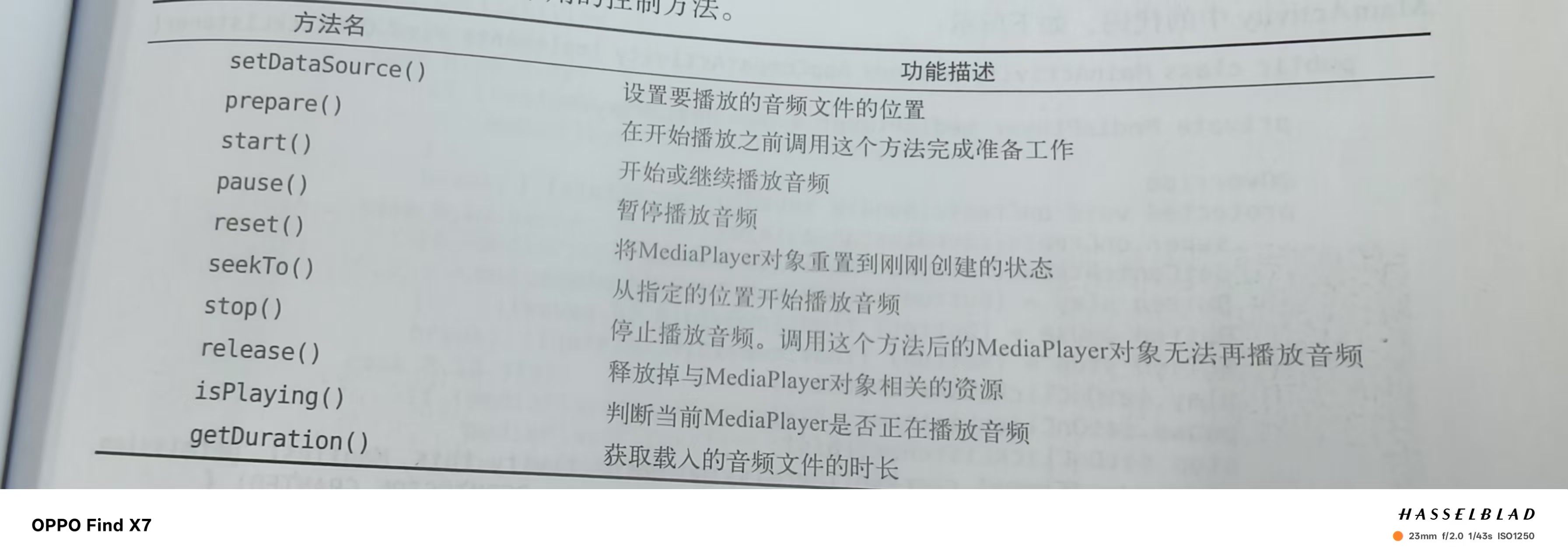
播放多媒体文件 播放音频 MediaPlayer类的方法:
1.创建一个MediaPlayer类
2.动态申请权限
3.调用initMediaPlayer方法对其进行初始化
1
2
3
4
5
6
7
8
9
10
11
12
13
14
15
16
17
18
19
20
21
22
23
24
25
<LinearLayout xmlns:android="http://schemas.android.com/apk/res/android" android:orientation="vertical" android:layout_width="match_parent" android:layout_height="match_parent" > <Button android:id="@+id/play" android:layout_width="match_parent" android:layout_height="wrap_content" android:text="Play" /> <Button android:id="@+id/pause" android:layout_width="match_parent" android:layout_height="wrap_content" android:text="Pause" /> <Button android:id="@+id/stop" android:layout_width="match_parent" android:layout_height="wrap_content" android:text="Stop" /> </LinearLayout>
1
2
3
4
5
6
7
8
9
10
11
12
13
14
15
16
17
18
19
20
21
22
23
24
25
26
27
28
29
30
31
32
33
34
35
36
37
38
39
40
41
42
43
44
45
46
47
48
49
50
51
52
53
54
55
56
57
58
59
60
61
62
63
64
65
66
67
68
69
70
71
72
73
74
public class MainActivity extends AppCompatActivity {private MediaPlayer mediaPlayer=new MediaPlayer (); @Override protected void onCreate (Bundle savedInstanceState) { super .onCreate(savedInstanceState); setContentView(R.layout.activity_main); Button play=(Button) findViewById(R.id.play); Button pause=(Button) findViewById(R.id.pause); Button stop=(Button) findViewById(R.id.stop); play.setOnClickListener(new View .OnClickListener() { @Override public void onClick (View view) { if (!mediaPlayer.isPlaying()){ mediaPlayer.start(); } } }); pause.setOnClickListener(new View .OnClickListener() { @Override public void onClick (View view) { if (mediaPlayer.isPlaying()){ mediaPlayer.pause(); } } }); stop.setOnClickListener(new View .OnClickListener() { @Override public void onClick (View view) { if (mediaPlayer.isPlaying()){ mediaPlayer.reset(); initMediaPlayer(); } } }); if (ContextCompat.checkSelfPermission(MainActivity.this , Manifest.permission.WRITE_EXTERNAL_STORAGE)!= PackageManager.PERMISSION_GRANTED){ ActivityCompat.requestPermissions(MainActivity.this ,new String []{Manifest.permission.WRITE_EXTERNAL_STORAGE},1 ); }else { initMediaPlayer(); } } @Override public void onRequestPermissionsResult (int requestCode, @NonNull String[] permissions, @NonNull int [] grantResults) { super .onRequestPermissionsResult(requestCode, permissions, grantResults); if (requestCode==1 ){ if (grantResults.length>0 &&grantResults[0 ]==PackageManager.PERMISSION_GRANTED){ initMediaPlayer(); }else { Toast.makeText(this , "拒绝权限将无法使用程序" , Toast.LENGTH_SHORT).show(); finish(); } } } @Override protected void onDestroy () { super .onDestroy(); if (mediaPlayer!=null ){ mediaPlayer.stop(); mediaPlayer.release(); } } private void initMediaPlayer () { try { File file=new File (Environment.getExternalStorageDirectory(),"music.mp3" ); mediaPlayer.setDataSource(file.getPath()); mediaPlayer.prepare(); } catch (Exception e){ e.printStackTrace(); } } }
1 <uses-permission android:name="android.permission.WRITE_EXTERNAL_STORAGE" />
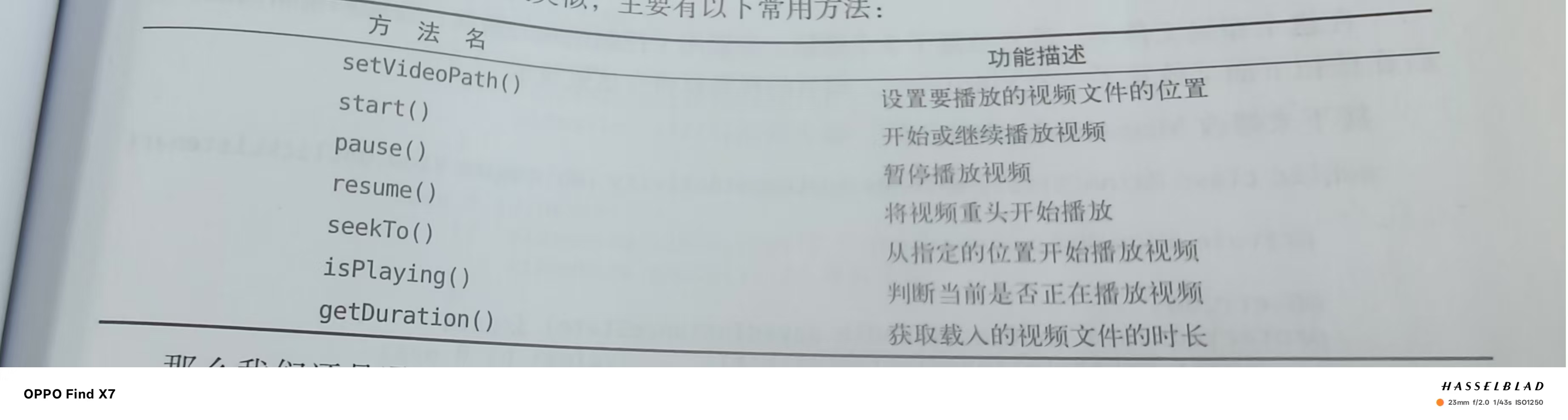
播放视频 VideoView类的方法:
1.创建VideoView实例
2.动态申请权限
3.利用initVideoView方法初始化
1
2
3
4
5
6
7
8
9
10
11
12
13
14
15
16
17
18
19
20
21
22
23
24
25
26
27
28
29
30
31
32
<LinearLayout xmlns:android="http://schemas.android.com/apk/res/android" android:orientation="vertical" android:layout_width="match_parent" android:layout_height="match_parent" > <LinearLayout android:layout_width="match_parent" android:layout_height="wrap_content" > <Button android:id="@+id/play" android:layout_width="0dp" android:layout_height="wrap_content" android:layout_weight="1" android:text="Play" /> <Button android:id="@+id/pause" android:layout_width="0dp" android:layout_height="wrap_content" android:layout_weight="1" android:text="Pause" /> <Button android:id="@+id/replay" android:layout_width="0dp" android:layout_height="wrap_content" android:layout_weight="1" android:text="Replay" /> </LinearLayout> <VideoView android:id="@+id/video_view" android:layout_width="match_parent" android:layout_height="wrap_content" /> </LinearLayout>
1
2
3
4
5
6
7
8
9
10
11
12
13
14
15
16
17
18
19
20
21
22
23
24
25
26
27
28
29
30
31
32
33
34
35
36
37
38
39
40
41
42
43
44
45
46
47
48
49
50
51
52
53
54
55
56
57
58
59
60
61
62
63
64
65
public class MainActivity extends AppCompatActivity implements View .OnClickListener {private VideoView videoView; @Override protected void onCreate (Bundle savedInstanceState) { super .onCreate(savedInstanceState); setContentView(R.layout.activity_main); videoView=(VideoView) findViewById(R.id.video_view); Button play=(Button) findViewById(R.id.play); Button pause=(Button) findViewById(R.id.pause); Button replay=(Button) findViewById(R.id.replay); play.setOnClickListener(this ); pause.setOnClickListener(this ); replay.setOnClickListener(this ); if (ContextCompat.checkSelfPermission(MainActivity.this , Manifest.permission.WRITE_EXTERNAL_STORAGE)!= PackageManager.PERMISSION_GRANTED){ ActivityCompat.requestPermissions(MainActivity.this ,new String []{Manifest.permission.WRITE_EXTERNAL_STORAGE},1 ); }else { initVideoPath(); } } private void initVideoPath () { File file=new File (Environment.getExternalStorageDirectory(),"movie.mp4" ); videoView.setVideoPath(file.getPath()); } @Override public void onRequestPermissionsResult (int requestCode, @NonNull String[] permissions, @NonNull int [] grantResults) { super .onRequestPermissionsResult(requestCode, permissions, grantResults); if (requestCode==1 ){ if (grantResults.length>0 &&grantResults[0 ]==PackageManager.PERMISSION_GRANTED){ initVideoPath(); } else { Toast.makeText(this , "拒绝权限将无法使用该程序" , Toast.LENGTH_SHORT).show(); finish(); } } } @Override protected void onDestroy () { super .onDestroy(); if (videoView!=null ){ videoView.suspend(); } } @Override public void onClick (View view) { if (view.getId()==R.id.play){ if (!videoView.isPlaying()){ videoView.start(); } } else if (view.getId()==R.id.pause) { if (videoView.isPlaying()){ videoView.pause(); } } else if (videoView.isPlaying()) { videoView.resume(); } } }
1 <uses-permission android:name="android.permission.WRITE_EXTERNAL_STORAGE" />