
探究ContentProvider(Kotlin)
运行时权限
权限机制
分类
普通权限和危险权限(还包括一些特殊权限但使用不多,不参与讨论)
危险权限
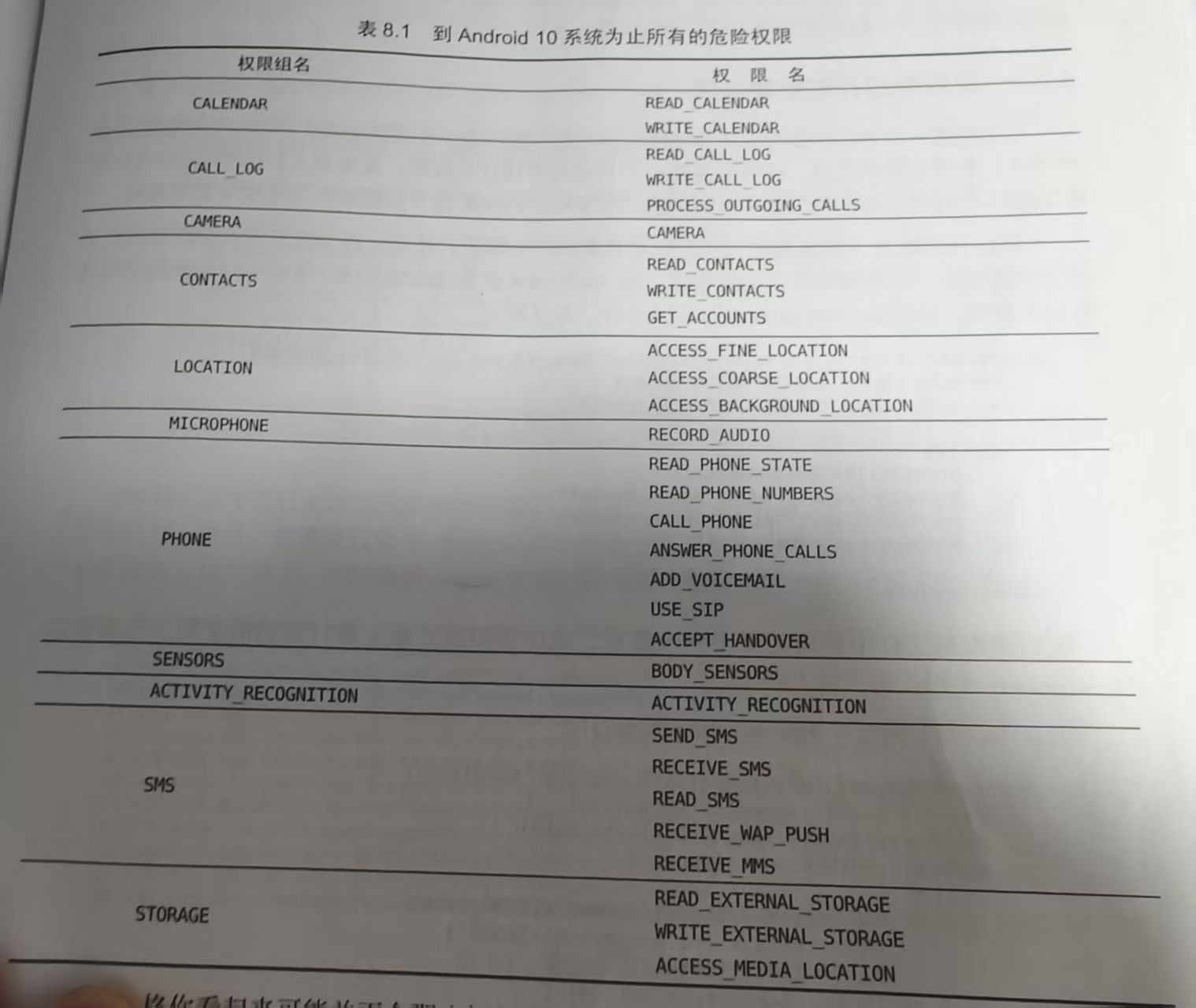
特点
普通权限直接在AndroidManifest.xml中声明即可
危险权限需要进行运行时权限处理
原则上用户一旦同意某一个权限申请,同组的其它权限会自动授权,但不要基于此规则来实现任何逻辑功能
运行时申请权限
1.在AndroidManifest.xml中声明权限
1 | <uses-permission android:name="android.permission.CALL_PHONE"/> |
2.检查权限是否授权
1 | if (ContextCompat.checkSelfPermission(this, Manifest.permission.CALL_PHONE) != PackageManager.PERMISSION_GRANTED) { |
3.调用onRequestPermissionsResult()方法申请授权
1 | override fun onRequestPermissionsResult( |
4.把权限授权后执行的逻辑封装
1 | private fun call() { |
ContentProvider基本用法
1.获取 ContentResolver 实例
在 Android 中,通常通过上下文(Context)来获取 ContentResolver 实例:
1 | val contentResolver = context.contentResolver |
2.添加数据
insert() 方法用于在 ContentProvider 中插入新数据,参数说明如下:
uri:目标数据的 URI
ContentValues:存储键值对数据
1
2
3
4
5
6
7val uri = Uri.parse("content://com.example.app.provider/city")
val values = ContentValues().apply {
put("name", "Beijing")
put("code", "BJ")
}
val newUri = contentResolver.insert(uri, values)
println("插入成功,新记录URI:$newUri")
3.删除数据
delete() 方法用于删除 ContentProvider 中的数据,参数说明如下:
uri:目标数据的 URI
selection:删除条件
selectionArgs:条件参数数组
1
2
3
4
5val uri = Uri.parse("content://com.example.app.provider/city")
val selection = "id = ?"
val selectionArgs = arrayOf("1")
val deleteCount = contentResolver.delete(uri, selection, selectionArgs)
println("删除了 $deleteCount 条记录")
4.查询数据
query() 方法用于从 ContentProvider 查询数据,参数说明如下:
uri:需要访问的数据的 URI,例如:
content://com.example.app.provider/cityprojection:需要查询的列数组,如果传入 null,则返回所有列
selection:过滤条件(WHERE 子句),可使用 ? 占位符
selectionArgs:过滤条件对应的参数数组
sortOrder:排序规则
1
2
3
4
5
6
7
8
9
10
11val uri = Uri.parse("content://com.example.app.provider/city")
val projection = arrayOf("id", "name", "code")
val cursor = contentResolver.query(uri, projection, null, null, "id ASC")
cursor?.use {
while (it.moveToNext()) {
val id = it.getInt(it.getColumnIndexOrThrow("id"))
val name = it.getString(it.getColumnIndexOrThrow("name"))
val code = it.getString(it.getColumnIndexOrThrow("code"))
println("City: id=$id, name=$name, code=$code")
}
}
5.更新数据
update() 方法用于更新 ContentProvider 中的数据,参数说明如下:
uri:目标数据的 URI
ContentValues:存储需要更新的字段和值
selection:指定更新条件
selectionArgs:条件参数数组
1
2
3
4
5
6
7
8val uri = Uri.parse("content://com.example.app.provider/city")
val values = ContentValues().apply {
put("name", "Shanghai")
}
val selection = "id = ?"
val selectionArgs = arrayOf("1")
val updateCount = contentResolver.update(uri, values, selection, selectionArgs)
println("更新了 $updateCount 条记录")
创建ContentProvider
新建一个类继承ContentProvider并重写6个方法(onCreate(),query(),insert(),update(),delete(),getType())
实现数据操作
- query():根据传入的 URI 查询数据,并返回一个 Cursor 对象。
- insert():根据传入的 URI 插入数据,返回新插入数据的 URI。
- update():根据 URI 更新数据,返回受影响的行数。
- delete():根据 URI 删除数据,返回删除的行数。
- getType():返回指定 URI 对应的数据 MIME 类型。
配置 URI 匹配器 使用
UriMatcher对传入的 URI 进行匹配,以便确定请求类型并执行相应操作。可以在静态代码块中添加匹配规则
1 | private static final UriMatcher uriMatcher = new UriMatcher(UriMatcher.NO_MATCH); |
- 在 AndroidManifest.xml 中注册 ContentProvider 在清单文件中注册你的 ContentProvider:
1 | <provider |
注意:android:exported 的值根据你的需求设置为 true 或 false。
通配符
*表示匹配任意长度的任意字符
#表示匹配任意长度的数字
MIME字符串组成
- vnd开头
- 如果内容URI以路径结尾则接android.cursor.dir/,如果内容URI以id结尾则接android.cursor.item/
- 最后接上vnd.
.
1 | /** |